W. D. Gann Tools Pro: our biggest update yet
A major Gann Tools Pro update — the full Jensen toolkit, TradingView-accurate arcs, chart squaring and more, plus a rundown of all 13 layers.
A major Gann Pro update
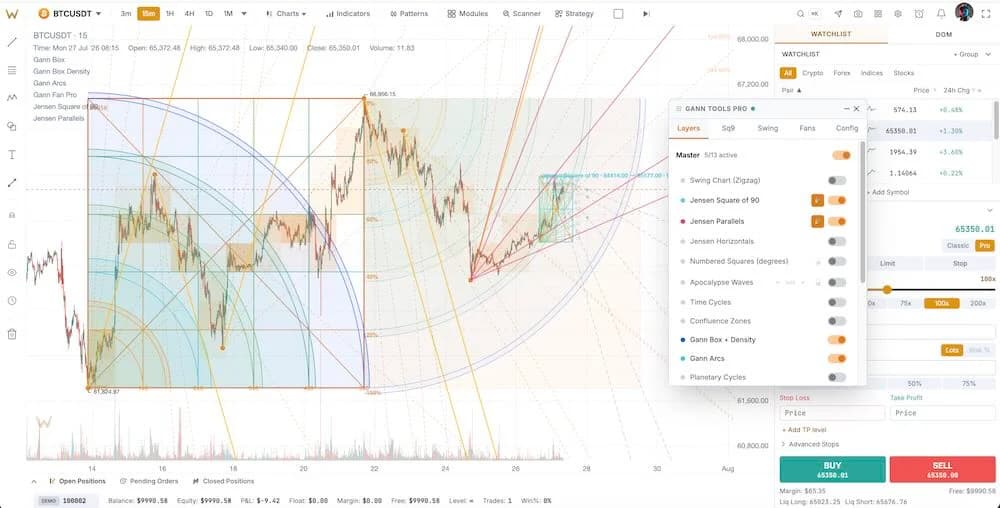
Gann Tools Pro — our premium Gann toolkit — just got its biggest update yet. We rebuilt it around one principle: every figure is anchored to prices and time, not to your screen, so it stays put when you zoom or pan.
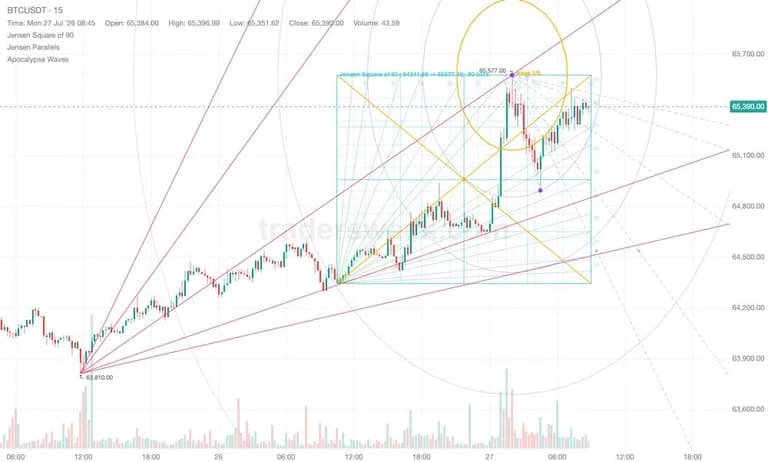
The headline additions are a full Robert Jensen toolkit — the Square of 90, Jensen Parallels and Jensen Horizontals, built straight from “Astro-Cycles and Speculative Markets” — plus TradingView-accurate Gann Arcs, Apocalypse Waves, and Numbered Squares with trines. A one-click Square the chart tool sets the bar width so one unit of time equals one unit of price (the geometric-chart rule every Gann figure relies on), and a per-layer freeze lets you lock any figure and study it undisturbed.
All 13 layers
Gann Tools Pro is a stack of 13 toggleable layers — turn on only what you need:
- Time Cycles — natural cycles (30/60/90/120/144/180/270/360 days) and Gann squares, with confluence zones where three or more cycles line up.
- Cycle Confluence — a combined view that highlights where multiple time cycles cluster.
- Gann Box — diagonals and 25/33/50/66/75% divisions, with volume-density shading in each cell.
- Swing Chart — 1-, 2- or 3-bar swings with a live trend state.
- Fan Pro — multiple auto-placed Gann fans; the scanner scores each angle's hit-rate.
- Square of Nine Pro — a price-anchored Square of Nine that lists levels and shows where price and time converge.
- Gann Arcs — the eleven TradingView arcs (1×0 to 5×1) radiating from the box's pivot corner.
- Apocalypse Waves — concentric waves from a swing pivot, steppable leg by leg.
- Numbered Squares — price and time in wheel degrees, with squaring detection and a trine ladder.
- Jensen Square of 90 — Jensen's Plate 1: a 90-unit square with rays to its sensitive points.
- Jensen Parallels — a fan whose pitch is copied onto the previous pivot to act as support and resistance (the 1×1 included).
- Jensen Horizontals — Plate 3 horizontals drawn from recent tops and bottoms.
- Planetary — optional Gann astrology: planetary longitude lines (off by default).